Beginner’s Power Guide: How to Start a Website from Scratch (No Tech Skills Needed)
If you want to start a website from scratch in 2025 but feel intimidated by technical jargon, this guide is for you. In clear, step-by-step language, I’ll walk you through planning your site, choosing tools, building pages, and launching — all without needing code. You’ll get practical checklists, platform comparisons, and content tips that help search engines and humans both. Whether you’re creating a personal portfolio, a small business storefront, or an affiliate blog, these methods prioritize speed, usability, and SEO fundamentals. Read on for an actionable roadmap that turns the intimidating into the doable.

Planning Your Site
Define Your Primary Goal
Start by deciding what success looks like. Is your site a portfolio, an online store, or an information hub? Clear purpose saves time later.
Identify Your Audience
List three customer personas. Know their questions, devices, and the language they use.
Map Essential Pages
At minimum, plan: Home, About, Services/Products, Blog, Contact. Outline what each page must accomplish.
Short paragraphs and a focused plan prevent scope creep. Use this plan as your content blueprint.
Choosing the Right Platform
Compare Easy Website Builders vs CMS
Easy builders let you drag and drop; CMS platforms like WordPress give more flexibility. Balance speed and control.
Platform Choice for Different Projects
For one-page portfolios, a site builder is ideal. For content-heavy projects or eCommerce, a CMS offers scale.
Costs and Scalability
Estimate monthly costs for hosting, domain, and premium themes/plugins. Prioritize platforms that let you upgrade without full migration.
If you’re learning how to make a website, the best place to start is with a reliable hosting provider like Hostinger, which includes guided setup, AI tools, and one-click WordPress installation.
Domain, Hosting, and Security
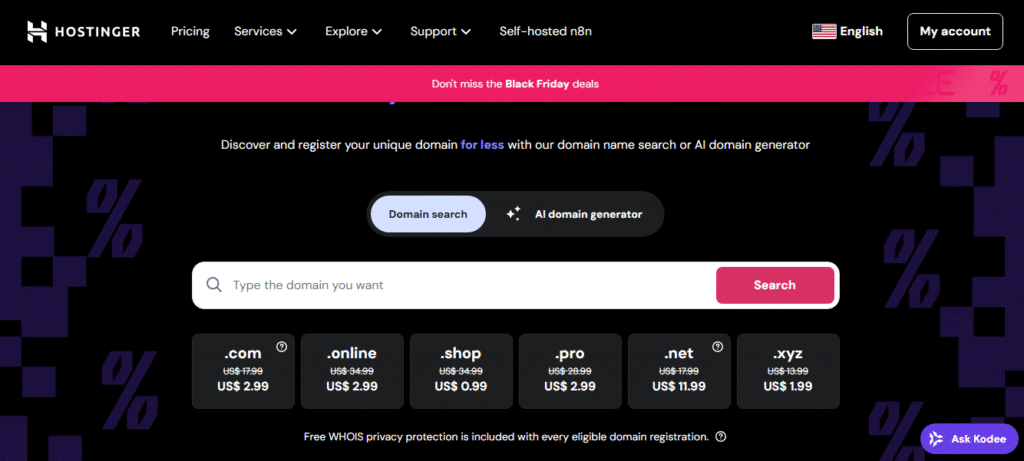
Picking the Right Domain Name
Choose something short, memorable, and brandable. Prefer .com when possible and avoid hyphens.
Hosting Essentials Explained
Hosting stores your files. For most beginners, shared or managed hosting balances price and performance. If you plan heavy traffic, look at scalable options, How Much is Domain and Hosting? Cost Explained
Secure Your Site
Get an SSL certificate (HTTPS), set strong admin passwords, and enable automated backups.
If you’re using WordPress, consider managed WordPress hosting from Hostinger. It includes automatic updates, performance optimization, and daily backups — perfect for beginners and small businesses alike.
Design and Content Essentials
Build a Simple, Consistent Design System
Limit fonts and colors. Use a readable type scale and clear CTA buttons.
Content That Converts
Write headlines that solve user problems. Use short paragraphs and bulleted lists for readability.
Accessibility and Mobile-First Design
Design for mobile first. Add alt text for images and ensure adequate color contrast.
A clean design and helpful content make visitors stay longer and search engines rank pages higher.

Creating Pages: Step-by-Step
Home Page Structure
Headline → Value proposition → Key benefits → Social proof → CTA. Keep it scannable.
About and Trust Pages
Tell your story, credentials, and guarantees. Use photos and clear bios to build trust.
Product, Service, or Blog Pages
Each product/service page needs features, benefits, pricing, and a clear next step. Blog posts should answer a single user question thoroughly.
Include internal links to guide visitors between relevant content and improve SEO.
Middle-of-Project Checklist
At this midpoint, ensure these tasks are done: domain registered, hosting active, core pages drafted, basic SEO tags added, and analytics installed. This is where many people stall — push through with a short sprint to get a working site live.
(Here is a mid-article placement of the main keyword: start a website from scratch.)
Technical Setup & SEO Basics
On-Page SEO Essentials
Add unique title tags and meta descriptions. Use header hierarchy (H1, H2, H3) and include your target phrase naturally.
Performance Optimization
Compress images, enable caching, and use lazy loading to speed pages up. Faster sites rank better and convert more visitors.
Analytics and Tracking
Install Google Analytics (or equivalent) and set up simple goals: newsletter signups, purchases, or contact submissions.
Short testing cycles help spot issues before you promote your site widely.
Launch Checklist
Final QA and Testing
Check links, forms, and mobile views. Test site speed and fix errors.
Announce the Launch
Share on social channels, email lists, and relevant communities. Consider a small ad test to jumpstart traffic.
Backup and Maintenance Plan
Schedule regular backups and plugin/theme updates. Keep a staging environment for bigger changes.
At launch, the aim is visibility and stability — not perfection.
Post-Launch Growth Strategies
Content Calendar and Blog Strategy
Produce regular posts that answer user questions and target long-tail terms. A consistent schedule builds topical authority.
Link Building and Partnerships
Guest posts, resource pages, and collaborations increase referral traffic and domain authority.
Measure and Iterate
Review analytics weekly. Double down on pages that drive traffic and conversions; rewrite or remove underperforming content.
This section is especially useful for a website for beginners focused on sustainable growth after launch.
Monetization & Advanced Options
Affiliate and Product Sales
If you sell digital products or recommend services, clearly disclose affiliate links and create comparison guides.
Email Marketing Funnel
Collect emails with a lead magnet. Nurture subscribers with helpful sequences that lead to conversions.
Upgrading Features with Scale
Consider staging, CDN, and managed services when traffic grows. Migrating to a more robust plan should be seamless with proper backups.
Troubleshooting Common Roadblocks
Slow Site Performance
Check image sizes, server response, and third-party scripts. Small fixes often yield big speed gains.
Low Traffic After Launch
Review keyword targeting, content depth, and on-page SEO. Promote posts where your audience already gathers.
Security Incidents
If hacked, restore from the latest clean backup, update credentials, and scan for vulnerabilities.
These fixes are practical and often faster than starting over.
Second Half — Final Tactical Steps
As you move into longer-term maintenance and growth, remember to track KPIs like organic traffic, bounce rate, and conversions. Revisit your initial plan quarterly to align content with audience needs.
Internal Linking Suggestions
- Link your Home page to core services and the About page.
- In blog posts, link to relevant product or service pages (3–5 internal links per long article).
- Create a resources page that aggregates top guides and tools — this becomes an evergreen internal hub.
Internal linking improves crawlability and distributes authority to conversion pages.
Final Checklist
- Registered domain and active hosting.
- Core pages published and mobile-optimized.
- Basic SEO: titles, meta, headings, and schema where applicable.
- Analytics installed and backups scheduled.
- 1-month content calendar ready.
Conclusion & Call to Action
You now have a practical, step-by-step plan to start a website from scratch , from planning and platform choice through launch and growth. Start small, publish fast, and iterate based on data.
If you’re ready to build your own professional website today, launch it with Hostinger’s beginner-friendly hosting plans — fast setup, free domain, and 24/7 support included.
The web rewards creators who take action. So choose your domain, pick a plan, and get your first page live this week.